


- Overview
- Features
- Specifications
- Accessories
- Warranty
- Videos
Overview
Our flagship model scans more documents faster and offers greater connectivity for easier access to shared data from anywhere
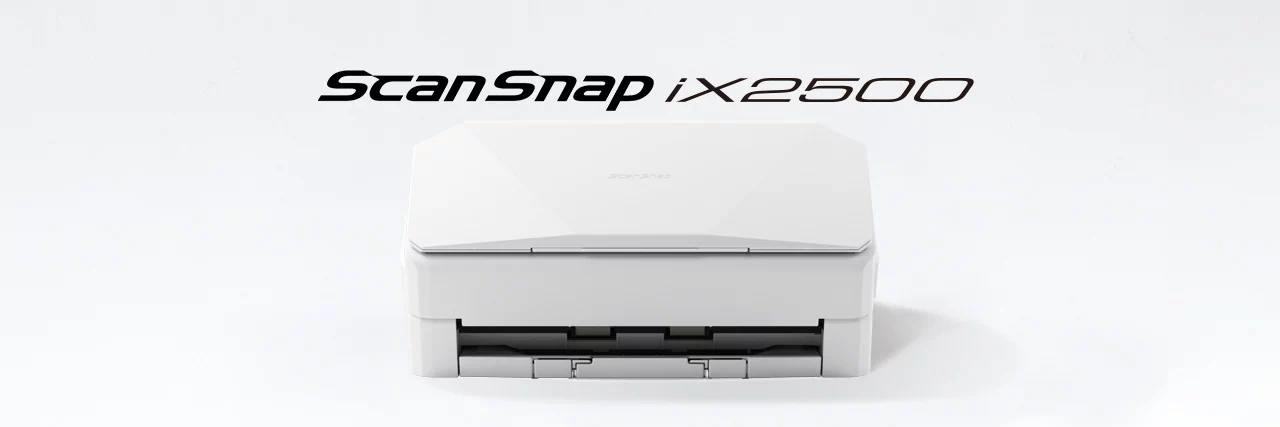
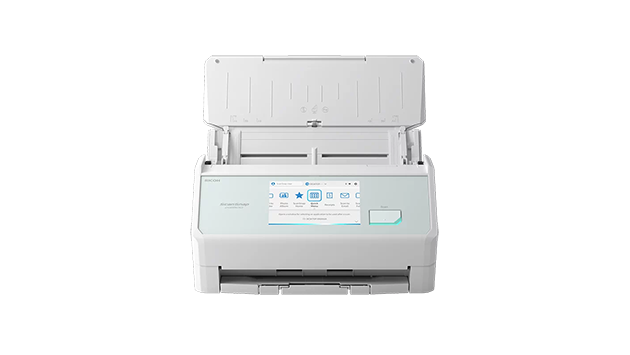
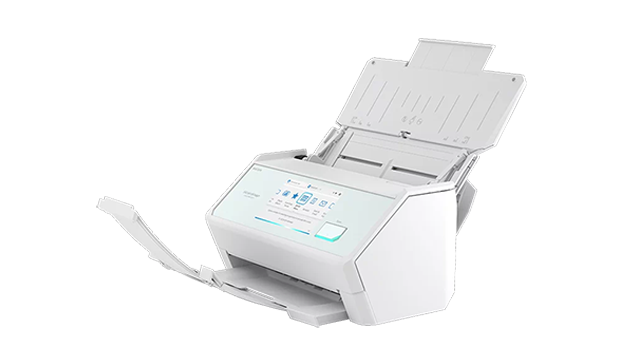
ScanSnap iX2500 is the evolved flagship model of the ScanSnap series, enabling scanning at higher speeds of 45 ppm/90 ipm (A4-size documents, color, 300 dpi). It comes with a large 5-inch touch screen to bridge the gap where the physical and digital meet. The device allows you to use your personalized settings anywhere, regardless of whether you are at home, the office, or a rental coworking space. It integrates seamlessly with digital services for utilizing scanned data and offers a user-friendly, stress-free experience.
• Intuitive 5-inch touch screen and smartphone-like usability
• Wi-Fi (2.4 / 5GHz*1) compatibility
• Secure connections with Wi-Fi 6/WPA3 support
• Speedy scans up to 45 ppm/90 ipm (A4-size documents, color, 300dpi)
• 100 sheets Automatic Document Feeder (ADF)
• For both individual and team use
• Balances high-speed scanning and fast startup with energy efficiency
• Best experience with ScanSnap Home
• Your usual settings and cloud save destinations are applied to the scanner
• Data Sync*2: Transcending device boundaries
• Save directly to a network folder and cloud services, or send to email without the need for a PC
• Seamless integration with various digital services
• Environmentally conscious product design and packaging materials
*1 Availability of 5 GHz Wi-Fi may vary depending on region.
*2 Data Sync will be available in a later update.

Features
Whether in the office, at home, or in a coworking space, instantly apply your personal scan settings to enjoy smooth scanning
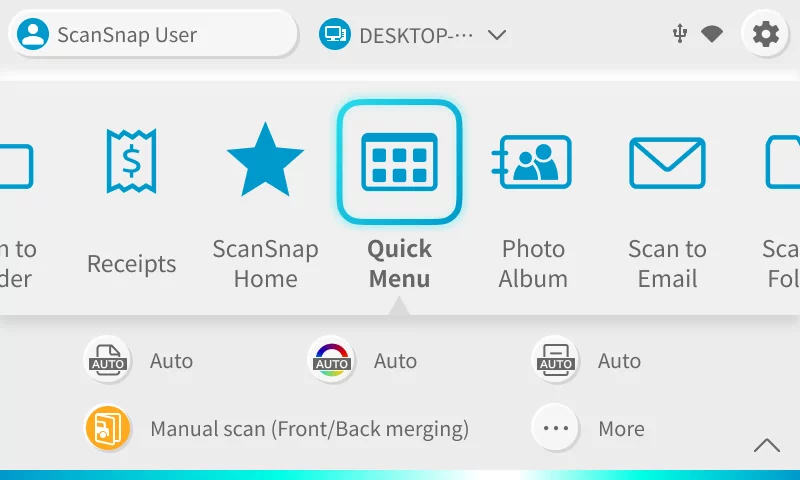
The large 5-inch touch screen with improved response allows you to view scan profiles created on your PC or smartphone as visual icons, such as saving destinations to PC folders or cloud services linked with ScanSnap Cloud. Furthermore, detailed scan settings, such as file format, color, image quality, and two-page stitching, can be configured on the touch screen, enabling the intuitive operation of the scanner.
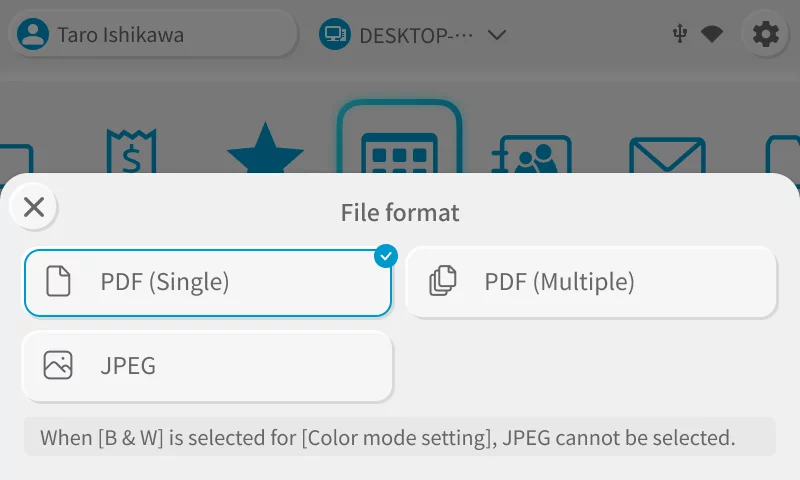
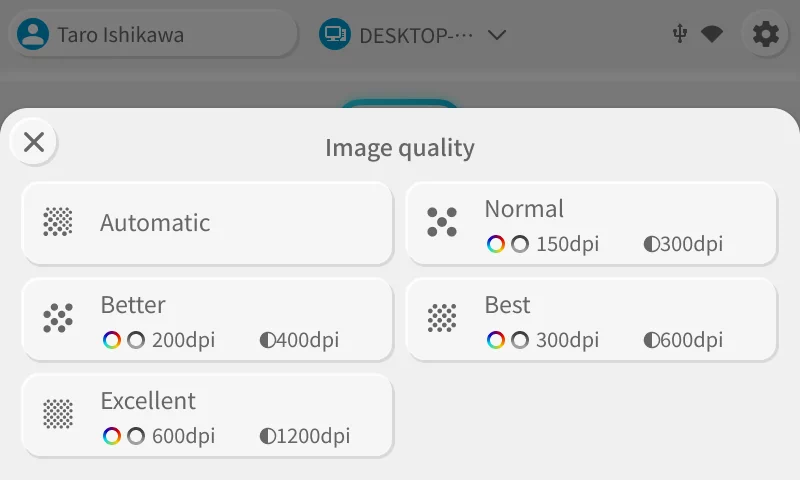
Your usual settings and cloud save destinations are applied to the scanner
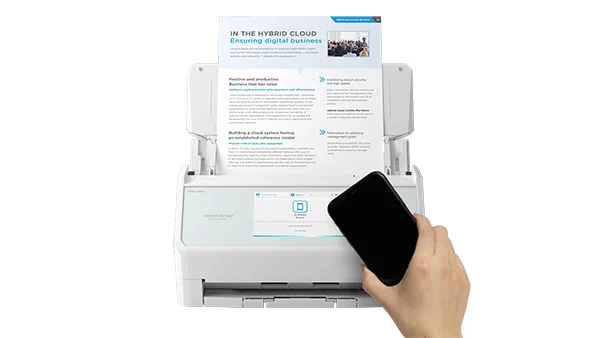
Use the ScanSnap iX2500 on any office floor or a rental coworking space with your own settings and save destinations! By connecting a device to the ScanSnap iX2500, your usual settings and cloud save destinations are applied to the scanner, allowing any ScanSnap iX2500 to function as your personal scanner.
In addition, you can temporarily apply your usual settings to the ScanSnap iX2500 by bringing your smartphone close to it.* Instantly access your usual settings with just a smartphone. Convenient but secure short-term use is available for a shared environment.
* This function will be available in a later update.
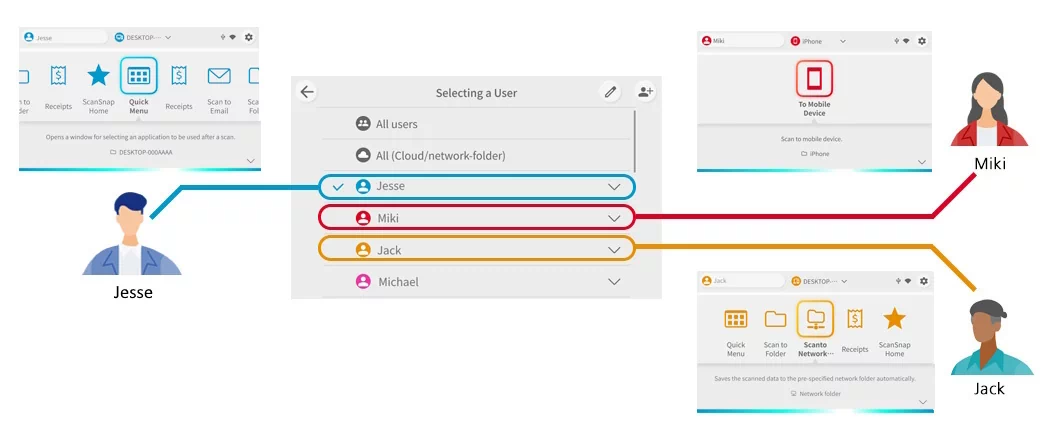
Intuitive user interface ideal for teams, families, and shared use
You can easily switch users on the touch screen to display your settings and icons, allowing you to scan without hesitation, even for shared use.
Privacy mode for peace of mind, even in environments used by many people
The Privacy mode of the iX2500 displays profile icons on the touchscreen only while the iX2500 is connected to a PC, smartphone, or tablet. Once the connection is severed, the profile information is deleted from the iX2500 unit, and the profile icons on the touchscreen disappear. This function ensures peace of mind when using the device in public spaces or coworking spaces where it may be used by many people.
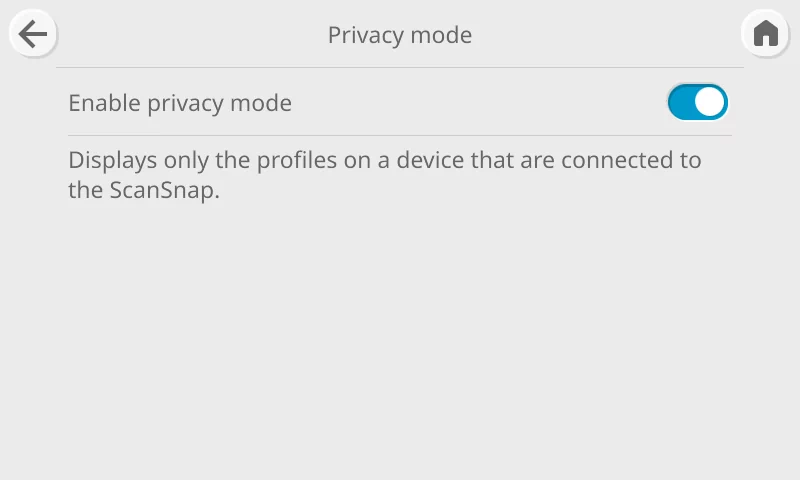
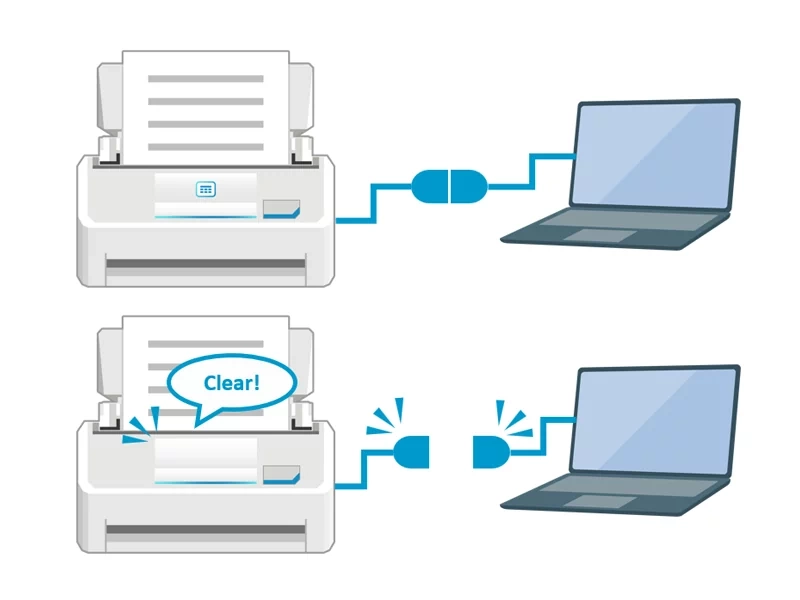
* In Privacy mode, only profiles that save data locally on your device are enabled. Profiles for saving to cloud services via ScanSnap Cloud or sending directly to email cannot be used.
Seamless integration with various digital services*1
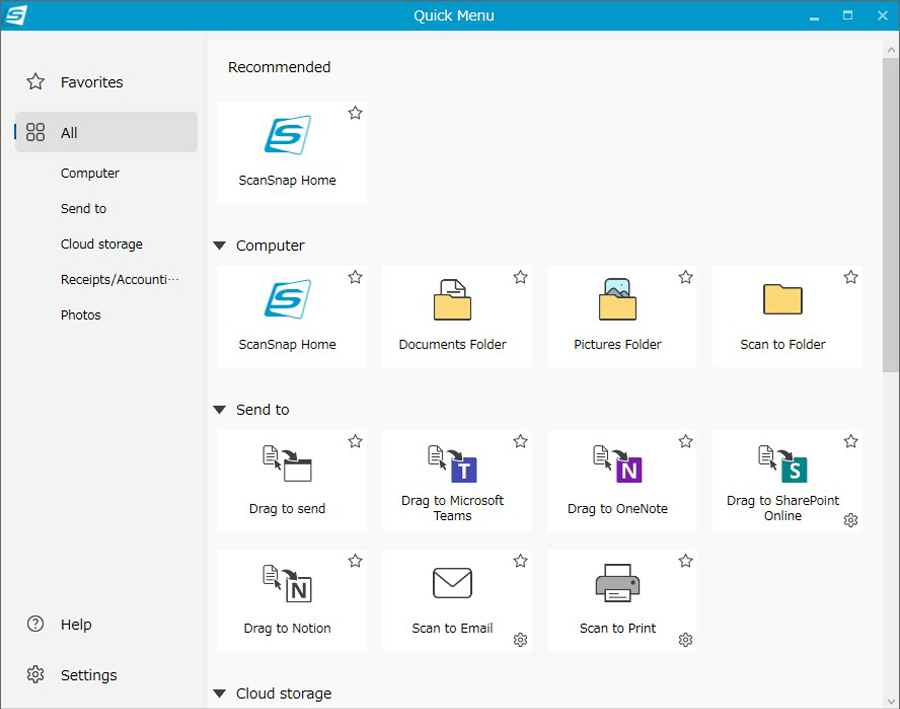
ScanSnap Home for PC has a revamped Quick Menu, which allows you to select saving and integration destinations after scanning. In addition to traditional options like folder saving and email sending, new integrations with Microsoft Teams, SharePoint, OneNote, Notion, and iCloud have been added.*2 For Microsoft Teams, OneNote, SharePoint, and Notion, the target applications' windows are opened, making data sharing a breeze. Moreover, various cloud services linked to the ScanSnap Cloud service*3 that would enable direct saving to the cloud are also suggested on the Quick Menu.
*1 Services differ by region.
*2 Need to install these applications on the user's PC to use the function.
*3 For countries where this service is available, please visit here.
Stress-free usability on a PC, smartphone, or PC-free
With a new scan engine and the next-generation iiGA SoC, the ScanSnap iX2500 offers a stress-free and comfortable user experience.
Comfortable scanning with ultra high speed performance and large capacity
Scans A4 color duplex documents at 45 pages per minute and 90 images per minute for stable, high-speed scanning on PCs, as well as smartphones, and tablets. The maximum ADF capacity is 100, and even when the Receipt Guide is installed, 50 A4 sheets can be loaded, making it easy to scan large volumes of documents.
Wi-Fi connectivity for both smartphones and PCs
The ScanSnap iX2500 supports Wi-Fi (2.4 GHz and 5 GHz bands) and enables wireless saving to smart devices and the cloud without needing a PC. With Wi-Fi 6 (IEEE 802.11ax) compatibility, the scanner ensures robust and stable communication, even in environments with radio interference and congestion. Additionally, it supports the WPA3 security protocol and TLS 1.3, safeguarding your valuable information.
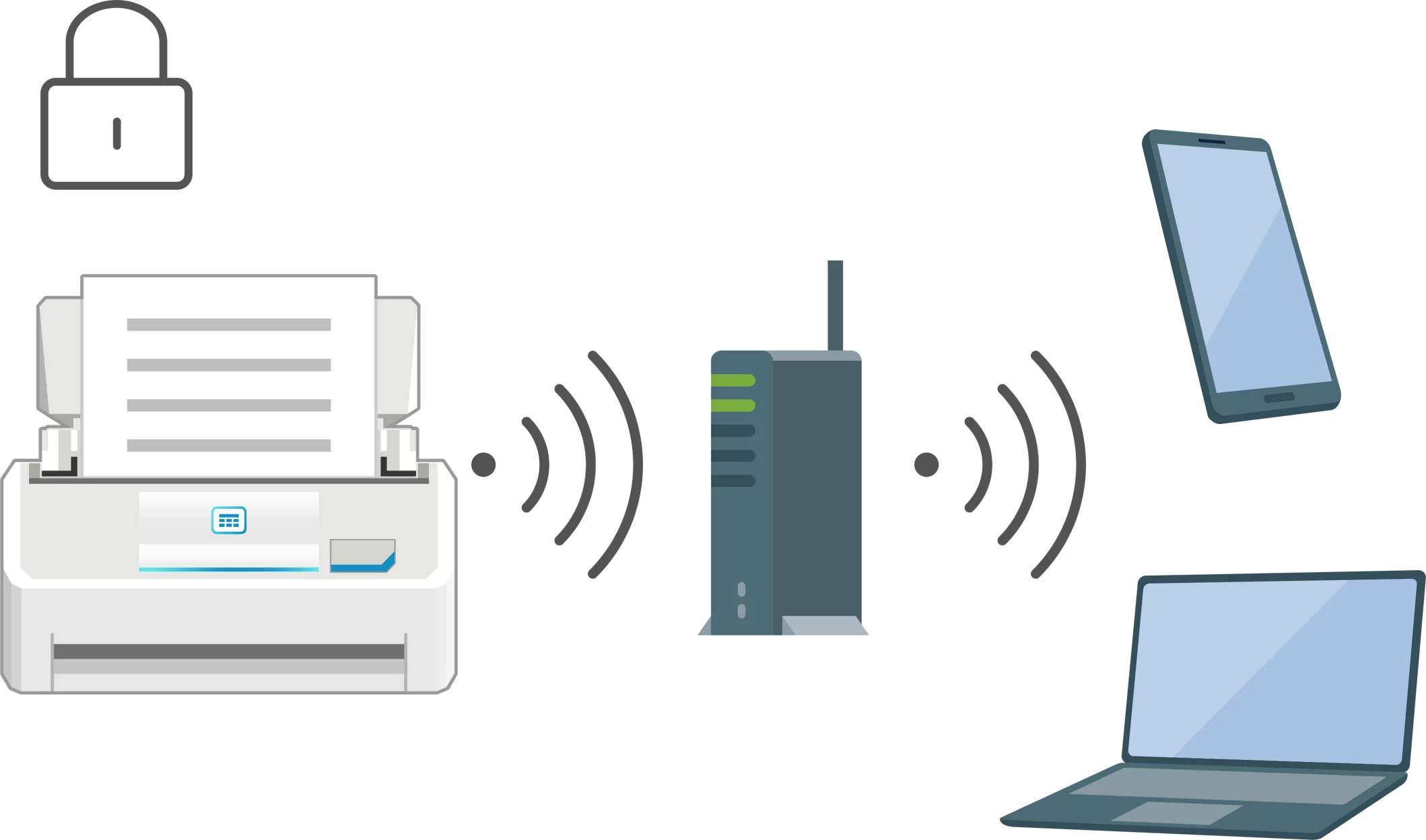
Save directly to a network folder*1*2 and cloud services, or send to email without the need for a PC
Save scanned data directly to network-attached storage (NAS) and to cloud services ScanSnap Cloud supports without a PC via touch screen operation.
Scanned data can also be sent via email using the icon (profile) to which a destination email address has been assigned in advance.
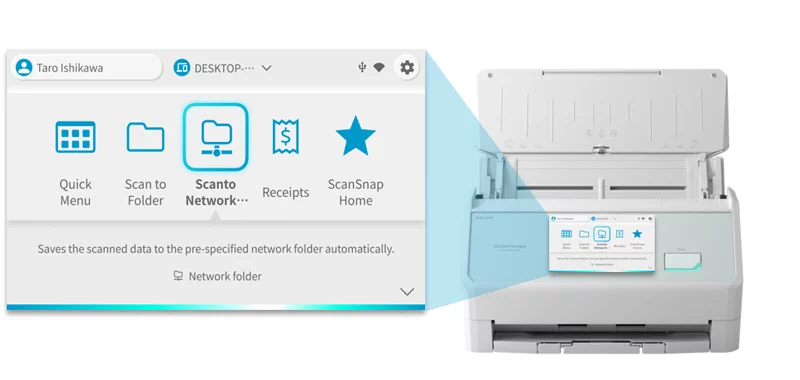
* A PC is required to set up this PC-less scanning function.
*1 Supports SMB 1.0 (disabled by default) to 3.1.1. Please refer to System Requirements for Network Folders That Can Be Directly Connected to the ScanSnap for system environments where the function is supported.
*2 Connection to the NTP server is required for use.
Environmentally conscious product design and packaging materials
Less plastic waste
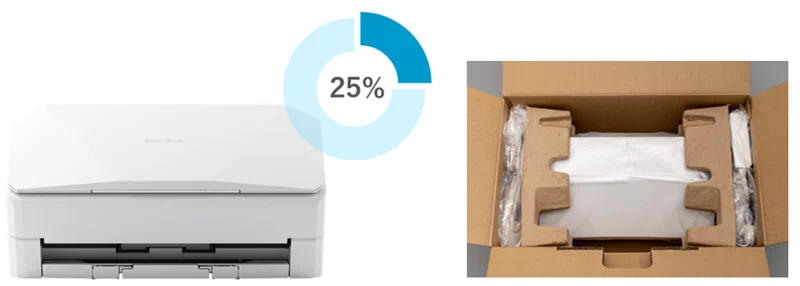
Recycled plastic is over 25% of the main unit's resin weight. We also use recycled plastics* and pulp molds for packaging and cushioning materials when transporting products, achieving zero use of virgin plastics derived from fossil resources. These contribute to reducing plastic waste.
* Pre-consumer materials, which have not been used by consumers and are generated during the manufacturing and molding processes, are used.
Energy-saving features minimize the environmental impact
Industry-leading energy-saving performance with a power consumption of 17 W during operation, 1.0 W during sleep mode with USB connection. In addition, after ten minutes of inactivity of the scanner, the scanner automatically enters sleep mode, reducing unnecessary power consumption.
Please refer to RICOH Image Scanners Environment for more information on our eco-friendly initiatives in our scanner products.
Cyber Security Act 2024 Compliant
Our scanners comply with the Cyber Security Act 2024. In accordance with the requirements of this legislation, our range of scanners will be supported until the required end of support date. This information can be found in the below PDF.
https://www.pfu.ricoh.com/global/scanners/eos/end_of_support_date.pdf
Specifications
As of October 15, 2025
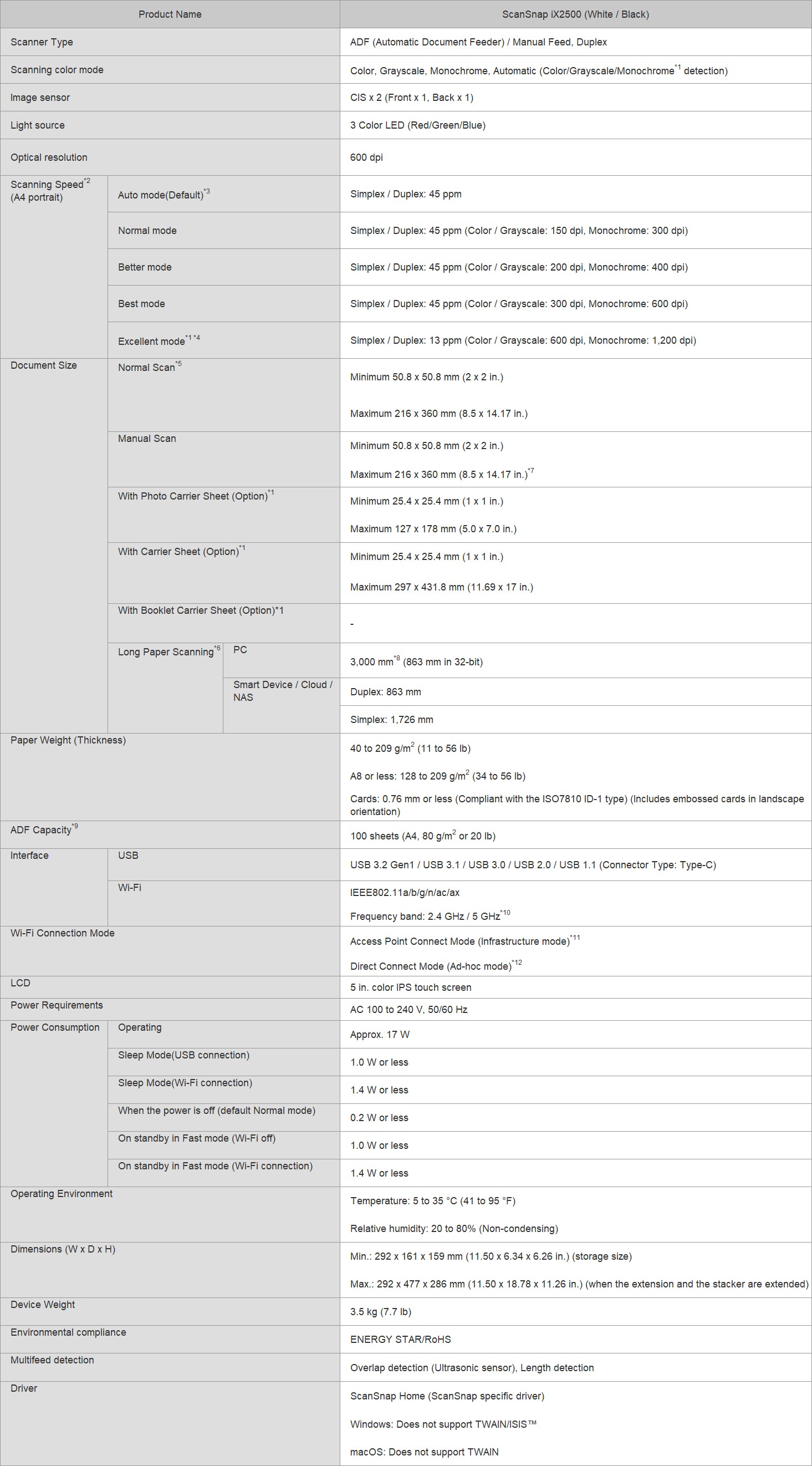
1. Available only when connecting to a computer.
2. Scanning speeds may vary due to the system environment. The values shown are the results of the evaluation under the following environment:
• Windows 11 / CPU: Intel Core™ i3-13100 4.5GHz / Memory: 8GB / Storage: SSD
• macOS Sonoma 14 / CPU: Apple M2 chip / Memory: 8GB / Storage: SSD / used Mac Mini (2023)
3. Scans will be performed in 300 dpi (Color/Grayscale) or 600 dpi (Monochrome) if shorter sides are less than 105 mm, and in 200 dpi (Color/Grayscale) or 400 dpi (Monochrome) if shorter sides exceed 105 mm.
4. This mode is not available when using ScanSnap Cloud or when saving directly to a network folder.
5. A3 scans are possible with use of A3 carrier sheets.
6. A document longer than A4 paper can be scanned one by one. Available in all modes except for “Excellent mode”.
7. A3, B4, 11 x 17 in. document sizes are required to be folded in half.
8. Up to 360 mm in Excellent mode.
9. Maximum capacity varies, depending upon paper weight.
10. Availability of 5 GHz Wi-Fi may vary depending on region.
11. Access Point Connect Mode requires a Wi-Fi access point or router.
12. 5 GHz Wi-Fi is not available with Direct Connect Mode.
System Requirements for PC
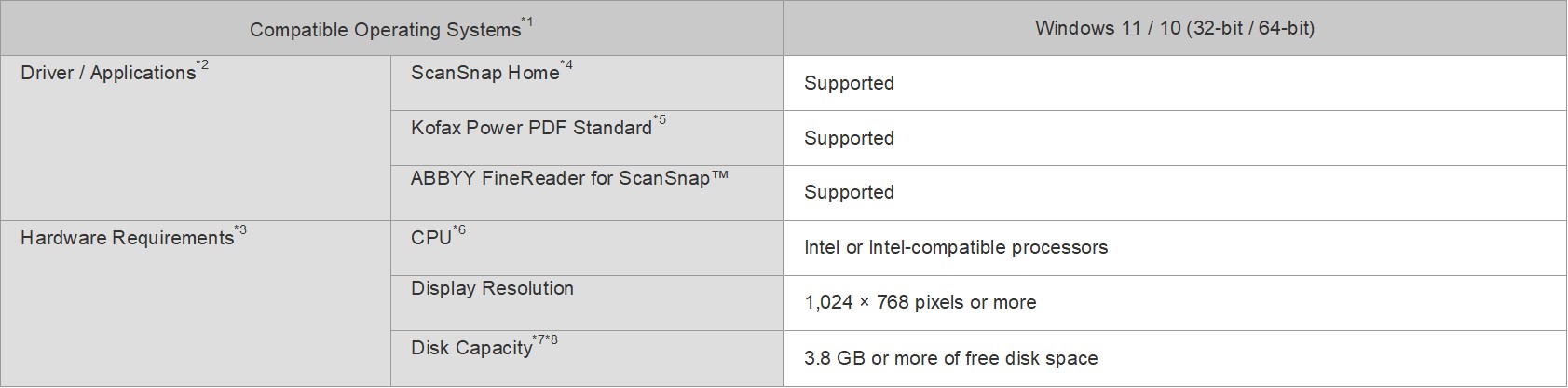
1. Operate Windows in desktop mode. ScanSnap scanners do not run with Windows 11 and 10 ARM-based PCs such as Surface Pro X (Microsoft).
2. Operating systems listed in this table are the only ones supported. Please refer to the ScanSnap Support site for the latest support information.
3. The ScanSnap device may not work if the connected computer does not meet these requirements.
4. ScanSnap Home Installation requires a computer and Internet. Please visit the ScanSnap Support site for download information.
5. Please refer to the included license certificate to download the software.
6. Scanning speeds may vary due to the system environment.
7. Indicated disk capacity requirements apply when downloading ScanSnap Home.
8. .NET Framework 4.8 or later must be installed. If it is not installed, it is installed with ScanSnap Home. Up to 4.5 GB of disk space is required for the installation.
*The system requirements may change depending on the support policies of the above system and third-party software.
System Requirements for Mac
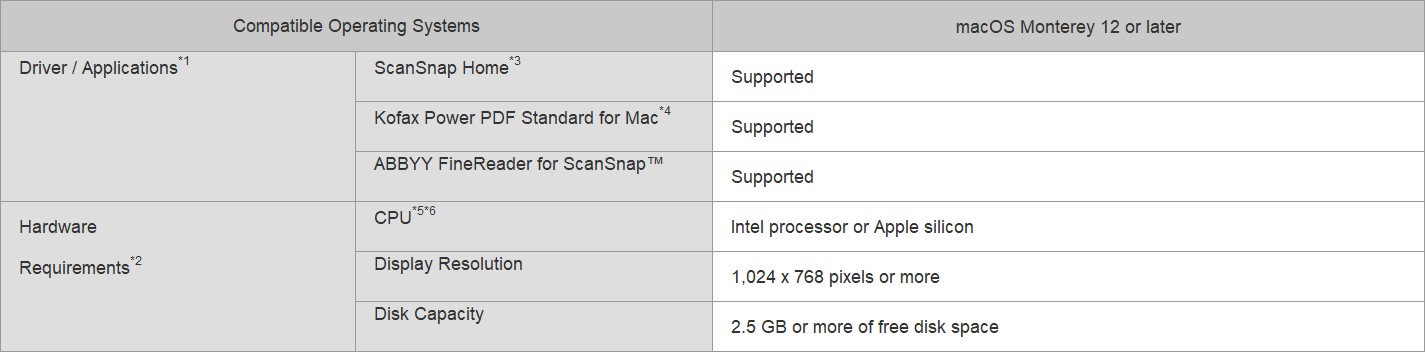
1. Operating systems listed in this table are the only ones supported. Please refer to the ScanSnap Support site for the latest information.
2. The ScanSnap device may not work if the connected computer does not meet these requirements.
3. ScanSnap Home Installation requires a computer and Internet. Please visit the ScanSnap Support site for download information.
4. Please refer to the included license certificate to download the software.
5. The ScanSnap device also operates with Apple Silicon-based Mac computers. Please refer to the ScanSnap Support site for the latest information.
6. Scanning speeds may vary due to the system environment.
*The system requirements may change depending on the support policies of the above system and third-party software.
System Requirements for Other Devices
For ScanSnap Home (for mobile), please refer to ScanSnap Home specifications tab.
Accessories
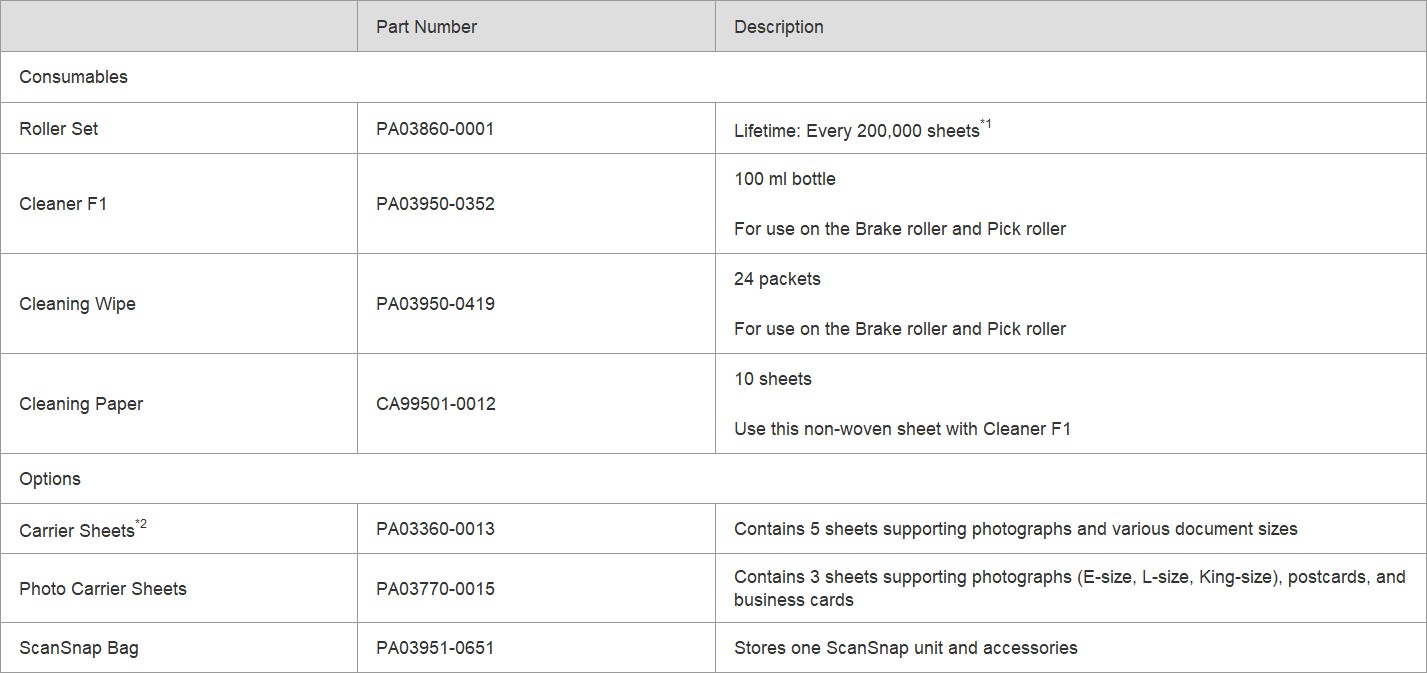
1. Replacement cycles are guidelines for using A4 documents (80 g/m² [20 lb]). These cycles vary depending on the type of documents scanned, how often the scanner is used and cleaned, and your operating environment.
2. Although ScanSnap Carrier Sheets have a listed lifespan of 500 scans, the lifespan may vary with usage. ScanSnap Carrier sheets are intended to scan paper documents with weights of 209 g/m² or less. They also support the scanning of folded documents that are as large as 216 x 297 mm.
*It is recommended to use original or approved accessories for consumables, options and cleaning kits, specially designed for your device. Device failures, troubles and damages arising from use of OEM or 3rd Party accessories may render your warranty invalid and incur charges for repair even during the warranty period.
Warranty
Find out the details about your product's warranty and information on how to extend your warranty.
Warranty Information (Worldwide)
Videos