


- Overview
- Features
- Specifications
- Download and Updates
Overview
ScanSnap Organizer makes it easier than ever to view, edit, and manage your PDF and JPEG files scanned with ScanSnap. It displays documents as thumbnails that you can preview in catalogue form for efficiency when searching. With a simple user interface, it allows you to create and sort folders without opening them, and flip through file pages quickly to save time. The conversion tool enables you to fully edit PDF files in Word and Excel, and with the ability to attach files to email or share drives, you can access and use your paperwork in a digital environment for increased productivity.
ScanSnap Organizer allows you to stay connected to all of your documents using ScanSnap Sync*, an embedded function that will synchronize files for access on your mobile devices. ScanSnap Sync automatically connects documents scanned through ScanSnap Organizer and the iOS or Android app ScanSnap Connect Application, so you can manage your information anytime, anywhere.
*ScanSnap Sync utilizes third party cloud services Google Drive, OneDrive and Dropbox to synchronize data between Connect Application and Organizer. Initial account registration for cloud service is required.
Features
Manage scanned data efficiently
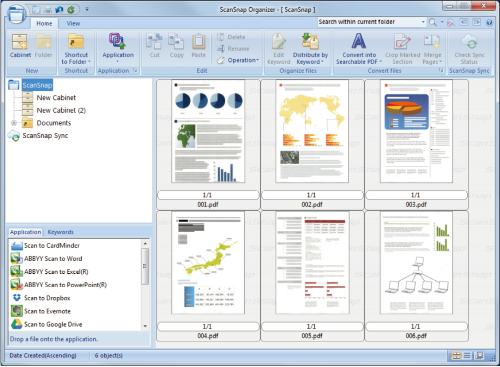
Take control over scanned files with ScanSnap Organizer. ScanSnap Organizer Viewer has a variety of functions for scanned files; you can view and edit the files, rotate, delete, move, insert, de-skew, crop, and merge pages, and add keywords to the files. You do not have to open the view screen to confirm whether the file is the one you are searching for since the other pages are displayed as thumbnails.
Quickly access information you need with the search function
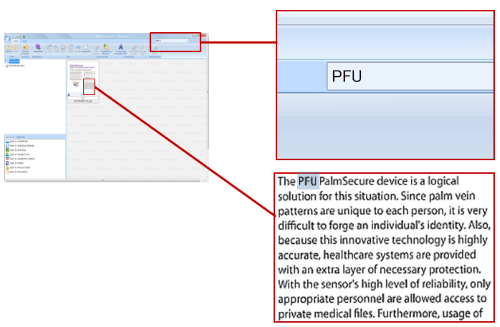
Quickly access files by converting paper documents into searchable PDF documents. ScanSnap Organizer performs a conversion while monitoring the capacity of CPU memory so the conversion takes less time to complete and the other processes on your computer are not disturbed. In addition to searching for keywords in text, you can even search pictures and illustrations once you set keywords to the scanned images.
ScanSnap Sync
Thanks to the ScanSnap Sync function, by using cloud services (to perform document synchronizations), the same document can be viewed from either a mobile device using ScanSnap Connect Application or a computer using ScanSnap Organizer regardless of where you are or what device you are using. With the ScanSnap Sync function, you can now edit documents scanned from mobile devices by using ScanSnap Organizer functions such as OCR or paper rotation.
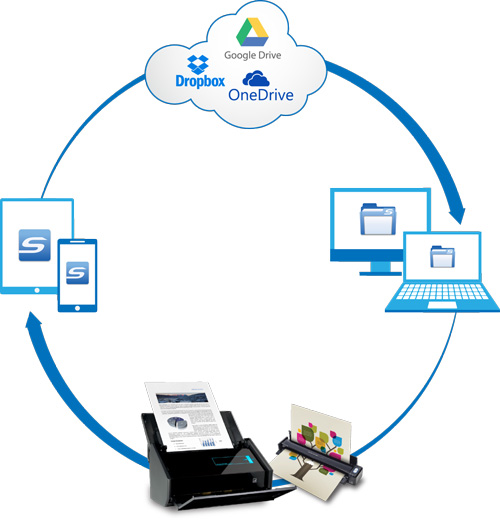
*Supported cloud services are Dropbox, Google Drive and Microsoft OneDrive.
Quickly apply the scanned data to practical situations
You can easily send scanned images to various applications (such as Dropbox, Evernote, Google Docs, Salesforce Chatter, e-mail, and printers) using the "Scan to" function.
You can convert scanned images to Word, Excel, and PowerPoint formats as well. With ScanSnap Organizer, you can quickly apply the scanned data to practical situations.

Specifications
System Requirements
Please refer to the specifications pages of each ScanSnap model.
ScanSnap Sync System Requirements
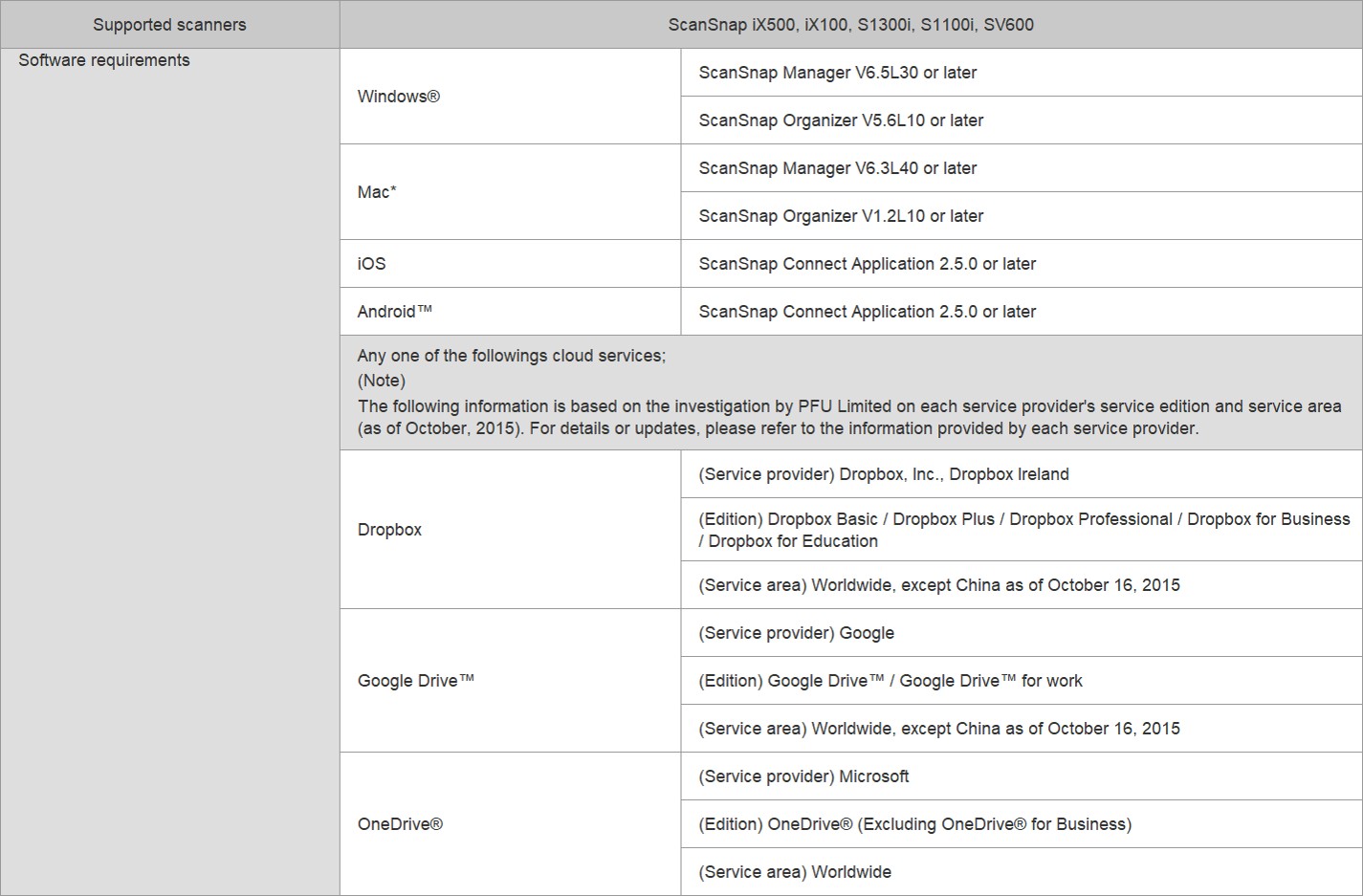
*ScanSnap Manager, ScanSnap Organizer, CardMinder, and ScanSnap Receipt are not available on the macOS v.10.15.
[Notes]
There might be other limitations based on cloud services and contract type. The following limitations will be applied when capacity of the cloud service or number of files exceed the limit.
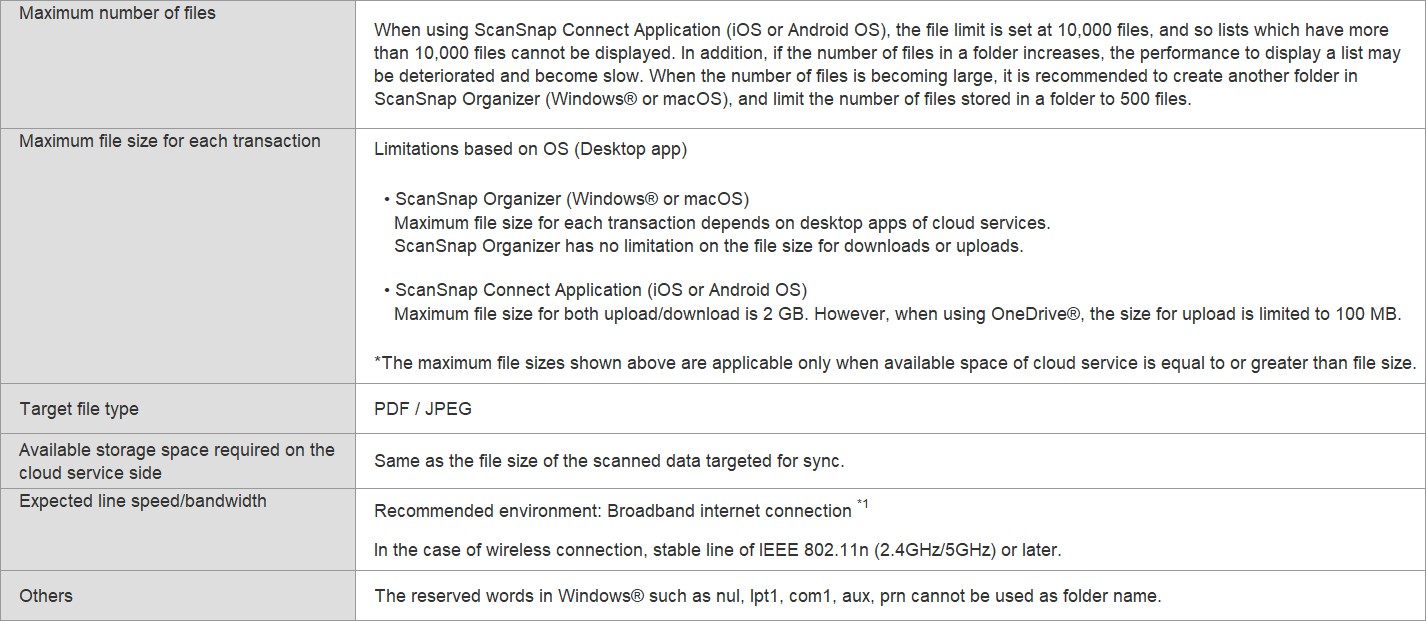
1. Put a check on "Synchronize On Wi-Fi Only" in "ScanSnap Sync Setting" (default setting is "on") if you would like to sync only while connecting via broadband connection (Wi-Fi Connection). It prevents unexpected data transmission with the other connection (such as 3G and 4G).
For more requirements click here to choose your scanner model.