


- Overview
- Features
- Specifications
- Accessories
- Warranty
- Video
Overview
Touchpoint for direct information sharing
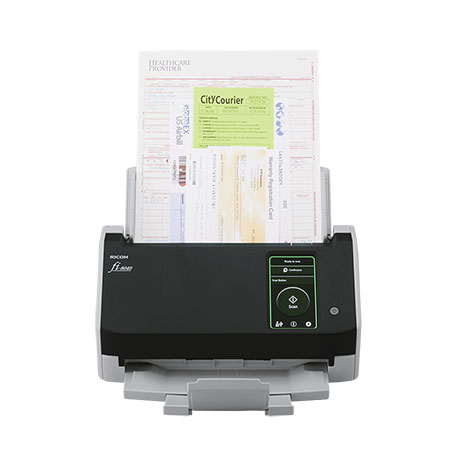
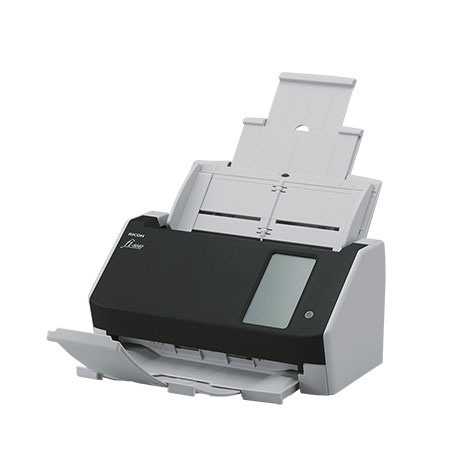
The fi-8040 offers new options to meet real-world productivity with "DirectScan" function with PC-less network compatibility. It enables PC-less scans and attaches the scans to emails directly. Despite being compact, the scanner achieves scan speeds of 40 ppm/80 ipm (200/300 dpi, color, A4 portrait), loads up to 50 sheets at a time, and comes equipped with a capability of scanning up to as many as 6,000 sheets a day.
• Comes with "DirectScan" function to enable PC-less scans and attaches the scans to emails directly
• User-friendly 4.3-inch touch screen to achieve better user experience
• Scan a wide variety of documents with just a switch to the Manual Feed Mode
• Supports both LAN and USB 3.2 connectivity
• Optimized high-quality image data with "PFU Clear Image Capture"
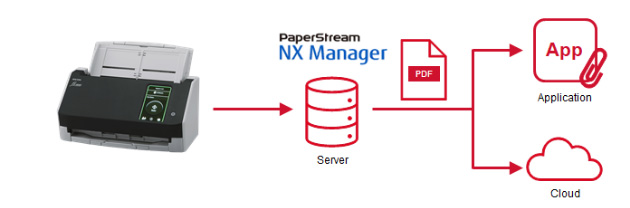
• Linking scanned data to business software applications and cloud services with PaperStream NX Manager
• PaperStream Central Admin that enables setting DirectScan function to multiple scanners
• PaperStream IP and PaperStream Capture providing advanced image processing functions, with PaperStream Capture Pro and Pro Premium software as superior options
• PaperStream ClickScan for ad-hoc use

Features
"DirectScan" breakthrough. PC-less scanning
Save scans directly to network folders
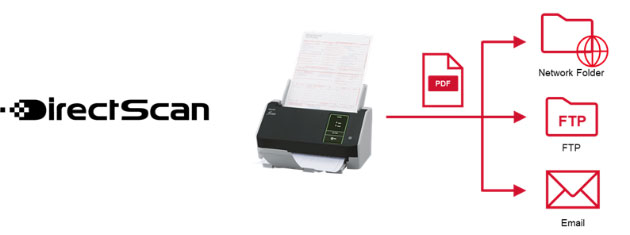
Equipped with the "DirectScan" function*, the fi-8040 enables PC-less scan and saves scanned data directly to network folders or FTP servers by setting destination storage locations in advance. The setting can be done easily with a web browser for a single unit or with the PaperStream Central Admin for multiple units. The scanner acts as a platform for business solutions to share data among multiple departments, work teams, and remote work environments.
*DirectScan function is available only when the time is synchronized with an NTP server.
Attach scans to e-mails directly and share with multiple users
Compact but equipped with a 4.3-inch touch screen, the scanner allows ease of designating recipients, attaching and sending scans, all from the touch screen. Filenames and sizes can be verified before sending. The fi-8040 is an ideal scanner for use with multiple users in office as well, for information sharing, as a possible replacement for the conventional fax.
Seamless integration with client systems. Workflow efficiency
Use the PaperStream NX Manager to link scanned data to business software applications and cloud services. Explore enhanced workflow efficiency, and implement work operations smoothly to include wider variety of locations on trusted and stable environment.
Boosted usability and flexibility for any environment
User-friendly 4.3-inch touch screen for easy operation
Equipped with the touch screen on its compact body of the scanner, users are able to check scanned data before saving, attaching, and sending scans, all on the touch screen.
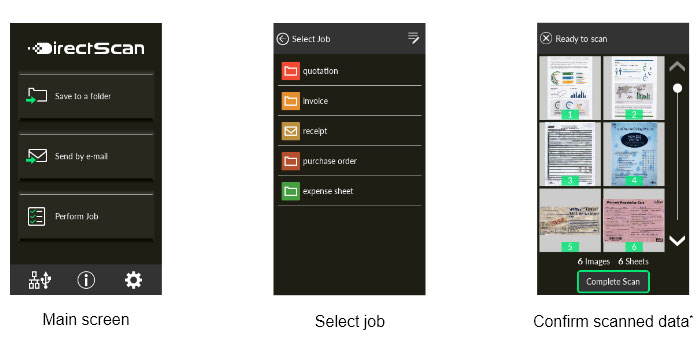
*Thumbnails of scanned data are shown for confirmation only when PC-less scanning.
Supports scanning of wide range of documents
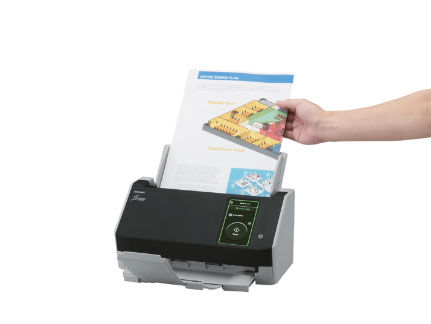
The scanner handles various types of documents, including plastic cards and A3, bi-folded, and multi-layered documents without the need for a carrier sheet. Plastic cards up to a thickness of 0.7mm can be read as well.
Optimized high-quality image data for business use
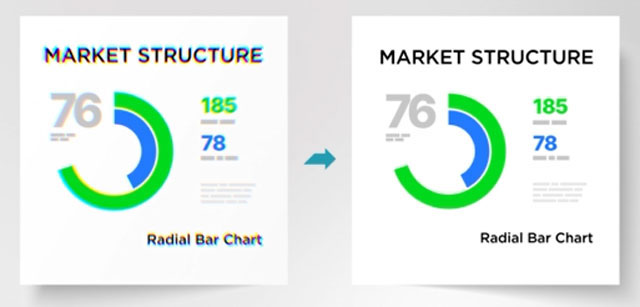
Combining the new CIS sensor with the GI image processing engine suppresses the occurrence of color shifts. "PFU Clear Image Capture" produces high definition images for data extraction while keeping power consumption to the minimum and reduces startup times.
Advanced software for higher productivity
Connect business workflow with PaperStream IP and PaperStream Capture
The PaperStream IP scanner driver, supporting both TWAIN/ISIS™, eliminates the need of making fine setting adjustments for OCR processes. It automatically converts images into exceptionally clean images, accelerating OCR even when scanning wrinkled, soiled and patterned documents. With an intuitive interface, PaperStream Capture allows users to feed information into their organization's workflow through various capture features during batch scanning effectively and efficiently.
Cyber Security Act 2024 Compliant
Our scanners comply with the Cyber Security Act 2024. In accordance with the requirements of this legislation, our range of scanners will be supported until the required end of support date. This information can be found in the below PDF.
https://www.pfu.ricoh.com/global/scanners/eos/end_of_support_date.pdf
Specifications
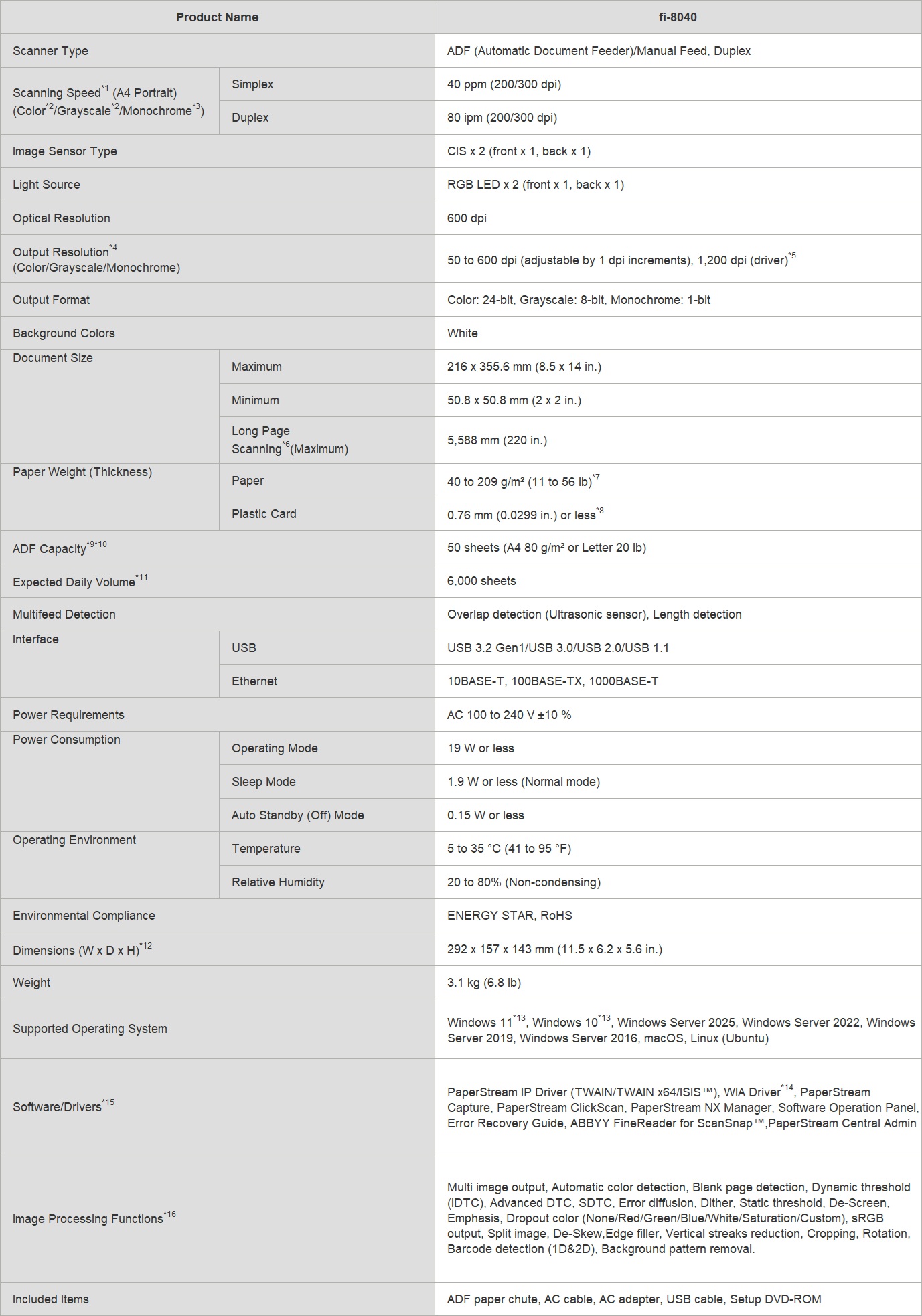
1. Scanning speeds may vary due to the system environment. The values shown are the results of the evaluation under the following environment:
• Windows 10/CPU: Intel Core™ i3-10105 3.7GHz/Memory: 8GB/Storage: SSD
2. Indicated speeds are from using JPEG compression.
3. Indicated speeds are from using TIFF CCITT Group 4 compression.
4. Selectable maximum resolution may vary depending on the length of the scanned document.
5. Limitations may apply to the size of documents that can be scanned, depending on system environment, when scanning at high resolution (over 600 dpi).
6. Capable of scanning documents longer than A4 (210 x 297 mm/8.3 x 11.7 in.) sizes. When using PaperStream IP (TWAIN/ISIS™) to scan at 200 dpi, the maximum scanning length is 5,588 mm (220 in.).
7. Thicknesses of up to 128 to 209 g/m2 (34 to 56 lb) can be scanned for A8 (52 x 74 mm/2.1 x 2.9 in.) sizes.
8. Multiple cards cannot be set continuously (Note: capable of scanning embossed cards).
9. Maximum capacity depends on paper weight and may vary.
10. Capable of setting additional documents while scanning.
11. Numbers are calculated using scanning speeds and typical hours of scanner use, and are not meant to guarantee daily volume or unit durability.
12. Excludes the ADF paper chute and stacker.
13. Supports ARM-based Windows 11 PCs with the 32-bit version of the PaperStream IP (TWAIN) driver only. Not supported on ARM-based Windows 10 PCs or with the PaperStream IP (ISIS) driver.
14. Functions equivalent to those offered by PaperStream IP may not be available with the Image Scanner Driver for macOS/Linux or WIA Driver.
15. Refer to the fi Series Support Site for driver/software downloads and full lineup of all supported operating system versions.
16. Some functions do not apply when using the "DirectScan" function. Refer to the fi Series Support Site for the latest functions.
Supported Operating System of Server When Processing DirectScan
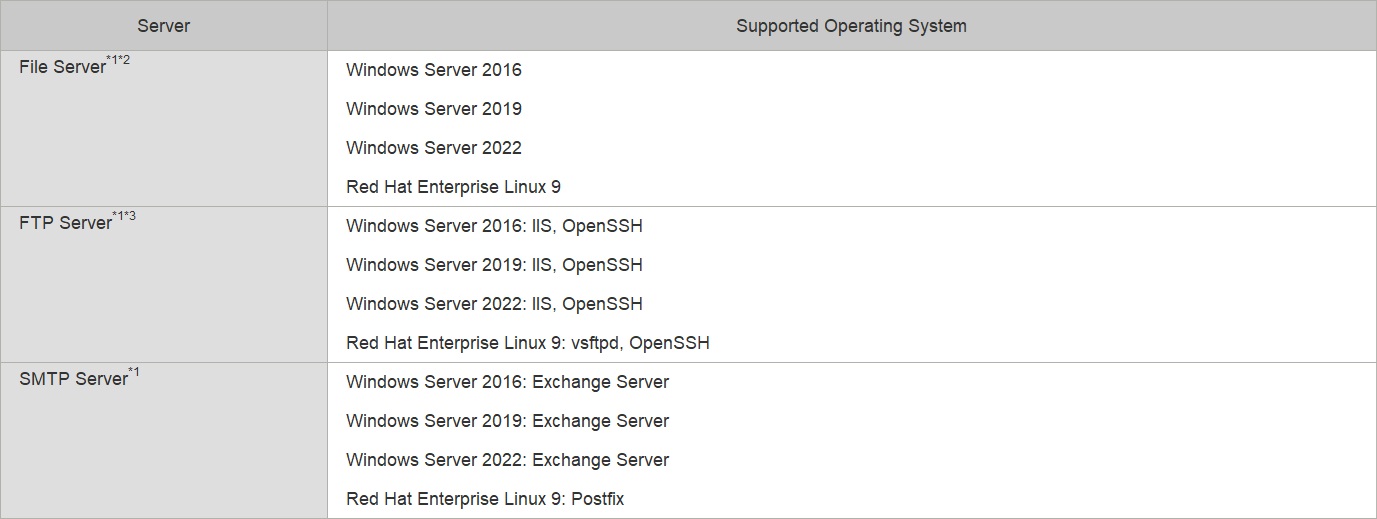
1. Resolve namespaces only with DNS protocol.
2. The supported SMB versions are SMB 2.0 to SMB 3.0.2. SMB encryption and DFS (Distributed File System) namespaces are not supported.
3. Scanning speed tends to slow down when data transfer is encrypted.
Accessories
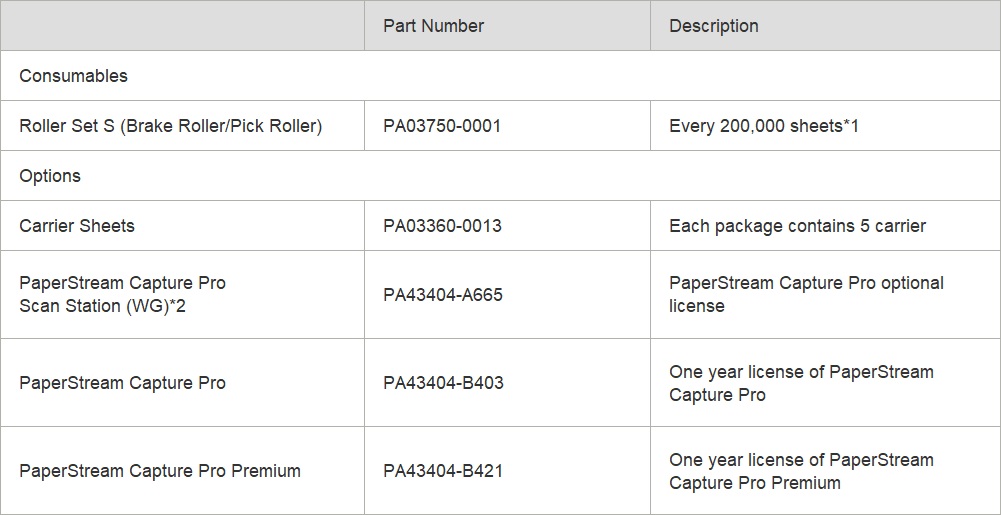
1. Replacement cycles are guidelines for using A4 documents (80 g/m2 [20 lb]). These cycles vary depending on the type of documents scanned, how often the scanner is used and cleaned, and your operating environment.
2. This is an optional license for existing users of PaperStream Capture Pro 4.1 or earlier.
The distribution of PaperStream Capture Pro 4.1 will be terminated in January 2026. Please consider using PaperStream Capture Pro/Pro Premium 5.0 or later.
Recommends use of original or approved accessories for consumables, options and cleaning kits designed for your device.
Device failures, troubles and damages arising from use of OEM or 3rd Party accessories may render your warranty invalid and incur charges for repair even during the warranty period.
Warranty
Find out the details about your product's warranty and information on how to extend your warranty.
Warranty Information (Worldwide)
Video